|
tech specs
|
|
|
|
|
| Expand All |
Form Setup |
- API support for setting up fields, form templates, and sets of form templates
- Flexible architecture for defining custom operations at any stage of processing
- Define OMR, text, image, or custom fields on each form
- Extensive support for form processing operations
|
|
Form Identification |
- Match forms against previously defined unfilled templates and return confidence values
- Provide automatic identification without the need for registration marks, ID marks, or anchor marks
- Match forms that are rotated 90, 180, or 270 degrees from template image
- Match forms that have been scaled from 90% to 110% of the template size
- Match forms scanned with resolution of 50% to 150% of the template resolution
- Match forms that are skewed up to 20 degrees by pre-processing with the included ScanFix
- Identify thousands of different forms
- Limit a recognition operation to a subset of the available templates
- Set the level of effort expended in completing form matching
- Return Identification Certainty indicating confidence of form matching
- Accept a Minimum Certainty level for acceptance as a matched form
- Return up to 100 alternative form matches of lower certainty
- Quickly identify forms, even when using very large sets of template forms
|
|
Form Registration |
- Automatically align a filled form to its master template based on image contents, to within one or two pixels of the blank template without requiring registration marks
- Analyze the master template form content and determine anchor points automatically
- Adjust alignment within a drop out zone to compensate for small differences between forms
- Support an alternate registration process using anchor marks in each corner
- Register forms even when the forms exhibit these characteristics:
- Skew (up to 20 degrees)
- Smaller or larger image size than the template (up to 10%)
- Forms scanned at different resolutions (up to 50% greater and lesser) than the template resolution
- Rotation (at 90, 180, and 270 degrees from the template)
|
|
Form Drop Out |
- Remove template forms at sub-second speeds
- Provide confidence values to highlight problem images
- Adjust for distortion caused by printing, copying or scanning
- Precisely remove lines, broken lines, shading, noise, guide text, and more
- Automatically repair text that intersects with lines or guide text defining the form, that was damaged during template removal (fills broken characters)
- Apply “character repair” across areas of the image where the form was removed
- Apply “character smoothing” to smooth the edges of characters for increased OCR accuracy
- Support for form drop out only within specified fields or the entire image
- Create new images using pixels cropped from a source image (field clips)

BEFORE AFTER
|
|
OMR (Optical Mark Recognition and Mark Sense) |
- Detect the presence or absence of marks or characters (for verification of signature presence for example)
- Support programmatic specification for bubble shape
- Support OMR recognition at 0, 90, 180, and 270 degree orientation
- Specify fields as grids (rows by columns) or single bubbles
- Support single and multiple mark recognition
- Recognize check-marked check boxes
- Set custom recognition parameters on a per-field basis
- Allow an unlimited number of fields
- Support programmatic specification for threshold for positive marks
- Return confidence values to check accuracy of OMR
|
|
Form Overlay |
- Enables the use of dropout to access the filled, variable data
- Overlay archived “data only” file over form template for display or print
- This process dramatically reduces storage requirements
- Increase data transmission speed
|
|
Zone Definition & Processing |
- Perform recognition on defined zones
- Perform image cleanup on defined zones
|
|
Optical Character Recognition (OCR) |
- Recognize English, Danish, Dutch, Finnish, French, German, Italian, Norwegian, Portuguese, Spanish, and Swedish character sets
- Recognize text using pre-defined character sets, including uppercase, lowercase, mixed case alphabetic, digits, currency symbols, combined currency and digits, arithmetic symbols and punctuation characters
- Recognition can be limited to any customer-defined subset of the full character sets
- Simultaneously recognize characters from all supported languages
- Return confidence values for each individual character, as well as the complete OCR result, to help manage the recognition process
- Return multiple character results with associated confidence values
- Specify the rejection character provided when recognition of a character fails
- Specify the confidence level below which the rejection character is returned
- Specify recognition segmentation parameters
- For MICR support, see SmartScan Xpress ICR
|
|
Intelligent Character Recognition (ICR) |
- Recognize hand-printed American and European English characters using pre-defined character sets: uppercase, lowercase, mixed case alphabetic, digits, currency (including $ (dollar), ¢(cent) € (Euro) £ (pound), ¥(Yen)), arithmetic and punctuation characters (including period, comma, single quote, double quote, ! & ( ) ? @ { } \ # % * + - / : ; < = >).
- Tailor recognition results by specifying custom character sets containing only expected values
- Return confidence values for each individual character, as well as the complete ICR result, to help manage the recognition process
- Return alternate character results with associated confidence values
- Specify the rejection character provided when recognition of a character fails
- Specify the confidence level below which the rejection character is returned
- Specify recognition segmentation parameters
- Support English characters only (for German, French, and Portuguese ICR see SmartScan Xpress ICR)
|
|
Compression & File Formats |
- See our web page showing ImagXpress File Format Support in Each Edition
- Support file formats from files, memory and URLs
- Support for 1, 4, 8, 16, 24, 32-bit images
- Support for 2 to 16-bit grayscale images, including window leveling
- Support beyond 8-bit, grayscale lossy JPEG
- Unicode (double-byte) characters are supported in text, file, and in thumbnail descriptors
- Support image-only PDFs (containing bitonal, grayscale, and color image data such as JPEG, JPEG 2000 or JBIG2) including file creation, adding new pages into existing PDF files, and viewing. Users may add on PDF Xpress for enhanced PDF support.
- Support TIFF including Group 3 and Group 4, JPEG, JPEG Type 7, CCITT RLE, LZW, Pack Bits, Deflate, IPTC metadata, TIFF tag editing, compacting of multiple page files, Wang TIFF annotation compatibility, 9 to 16-bit grayscale, and intrinsic orientation (the file itself contains a rotation angle that can be interpreted during display)
- Support vendor-specific Camera RAW - automatic detection and decompression of digital RAW photos from Canon, Fuji, Kodak, Minolta, Nikon, Olympus and more. (See list of makes and models)
- Password protect images using .pic, an Accusoft Pegasus Corporation format that allows greater compression and password capability. These files require Accusoft Pegasus products to view and manipulate them.
- ImagXpress Photo will read:
|
| AutoCAD 2000 - DWG, DXF, DWF |
JEDMICS C4 |
PGM |
| BMP |
JPEG 2000 (JP2, J2K) |
PIC / ePIC |
| CALS (Type 1) |
JPEG LS (JLS) |
PNG |
| CALS metadata edit (CALS tags) |
JPEG metadata edit (IPTC, EXIF) |
PPM |
| Camera RAW Formats |
JPEG metadata edit without opening file |
RAW |
| DCX (multi-page) |
JPEG, JIF |
TGA |
| DIB |
Lossless JPEG (LJP) |
TIFF (multi-page) |
| GIF (multi-page) |
MO:DCA, PTOCA, IOCA, ABIC (multi-page) |
TIFF (single page) |
| GIF (single page) |
PBM |
TIFF metadata edit (IPTC, TIFF tags) |
| HD Photo (JPEG XR)- HDP, WDP |
PCX |
WBMP |
| ICO (multiple image) |
PDF (multi-page, image only, with image compression) |
WMF, EMF |
| ICO (single image) |
PDF (single page, image only, with image compression) |
WSQ |
| JBIG2 |
|
- ImagXpress Photo will write:
|
| BMP |
JBIG2 |
PGM |
| CALS (Type 1) |
JPEG, JIF |
PIC / ePIC |
| CALS metadata edit (CALS tags) |
JPEG LS (JLS) |
PNG |
| DCX (multi-page) |
Lossless JPEG (LJP) |
PPM |
| DIB |
JPEG metadata edit (IPTC, EXIF) |
RAW |
| GIF (multi-page) |
JPEG metadata edit without opening file |
TGA |
| GIF (single page) |
MO:DCA, PTOCA, IOCA (multi-page) |
TIFF (multi-page) |
| HD Photo (JPEG XR)- HDP, WDP |
PBM |
TIFF (single page) |
| ICO (multiple image) |
PCX |
TIFF metadata edit (IPTC, TIFF tags) |
| ICO (single image) |
PDF (multi-page, image only, with image compression) |
WBMP |
| JPEG 2000 (JP2, J2K) |
PDF (single page, image only, with image compression) |
WSQ |
|
|
|
Thumbnail Image Support |
- An easy, flexible, memory-friendly way to add thumbnail image display is provided by the included ThumbnailXpress control
- Support a wide range of file formats (all those supported by ImagXpress and PDF Xpress)
- Multi-Page Image Support
- Display thumbnails of directories and/or multi-page image files
- Filter the contents of directories based on attributes such as file name, extension, date and time or size
- Display thumbnails of PDF files (when PDF Xpress is installed)
- Rapid Display
- Load thumbnails from memory buffer or IO.Stream
- Generate thumbnails asynchronously to provide the fastest display of thumbnail images possible
- Cache thumbnail images for quick scrolling and redisplay
- Caching support provides options to control the amount of memory used
- Multiple Navigation Options
- Create thumbnails in either vertical or horizontal mode (only one scroll bar will be active)
- Directory drill down
- Drag and drop thumbnails within and between thumbnail windows, and from other applications
- Programmatic scrolling
- Mouse wheel support
- Keyboard navigation
- Flexible Captions and Display Options
- Set thumbnail display options, including spacing between thumbnails, border width, border color, background color and painting order
- Set labels displayed with each thumbnail, either by automatically deriving from filenames, or programmatically controlled.
- Take advantage of extensive font formatting options
- Set the size of the container for thumbnail images
- Set component, cell, text, and background colors
- Associate user-defined data with thumbnail images
- Unicode support for thumbnail descriptors
- Flexible Image File Selection
- Select one or multiple thumbnails using the mouse
- Create custom actions using mouse methods and events
- Retrieve information about the thumbnail image including its height, width, and current status
- Retrieve the name of the original image used to create the thumbnail
- Easy Integration with Other Pegasus Components
- Save thumbnail image as Bitmap, HBitmap, or Picture object
|
|
Document Image Processing and Editing |
- Comprehensive set of over 80 image processing functions
- Automated 1 bpp image cleanup
- Auto Binarize
Analyzes the image and automatically optimizes binarization settings when converting to a bitonal image
- Configurable Binarization and Half Toning
BEFORE

AFTER

- Anti-alias and scale to gray
- Advanced merging capabilities
- Autocrop
- Automatic Deskew
Automatically detect and remove skew from bitonal images. Detection focuses on the content of the image, such as text and drawings, rather than the border. You can also specify acceptable skew angle, quality, and confidence levels.
- Despeckle
Use advanced technology to remove specks from bitonal images, including specification of speck size and reporting of number of specks removed.
- Line Removal
Remove lines of defined size, thickness, and other specifications, from bitonal images. Report the number of lines removed.
- Dilate
Add black pixels to extend objects vertically, horizontally, or diagonally.
- Erode
Remove black pixels from objects in bitonal images vertically, horizontally, or diagonally.
- Smooth Zoom
Enhance character clarity, using Smooth Zoom. Replace an image with a new image with width and height doubled and with pixels smoothed.
- Shear
Apply rotation of bitonal images, along only the vertical or horizontal axis, by the specified angle in degrees. Allow the user to specify the color with which to pad the image.
- Hole Punch & Blob Removal
Locate and remove all black blobs (e.g. hole punch marks) in bitonal images, within a defined search area, based on size or density. Detect and report the number of blobs found within the search area.
BEFORE

AFTER

- Blank Page Detection
Automatically determine that a page is blank within a set of bitonal images, by detecting if no objects are found to exceed the minimum object dimension. A border (top margin, left margin, right margin, bottom margin) within which to test for blank page, and minimum confidence, can be specified.
- Border Crop
Remove the black border around a bitonal image

BEFORE AFTER
- "Preserve Dark" Detail Enhancement
- Ideal for enhancing thumbnail images or images that are zoomed out
- Preserve the dark pixels of an image when an image is scaled at ratios less than 1:1 (many pixels are averaged for the one displayed)
- Avoid losing details in fine lines or fine text
- Retention of image transparency
- Color anti-aliasing and smoothing for zoomed
- Adjust contrast, brightness, hue, saturation, gamma, and more (Display adjustment of contrast, brightness, and gamma)
- 24, 8, 4, and 1-bit color depth conversions with advanced palette control
- Area and region processing
|
|
Photo Editing & Image Processing |
- Auto Red Eye Removal
- Automatically detect and correct red eyes in digital photos using the Accusoft Pegasus algorithm
- Receive a list of red eye regions and the associated "confidence level" for each region, supporting automated removal based on set criteria

BEFORE AFTER
- Auto Color Correction & Auto Lightness Correction
- Manually or automatically adjust color and contrast, while maintaining detail in shadow and highlight areas of the image
- Auto Color Level
BEFORE

AFTER

- Auto Contrast
- Alpha Channel Support
- Support the full color channel within images (e.g. alpha, integration, separation) including alpha channels
- Float images and entities (including with transparency) on top of the base image with smooth display
- Photo Collage Layout and Printing
- Precisely place borders on a page for printing
- Dust Removal
- Remove dust specks from color images
- User provided parameter settings include speck size, light or dark specks, and smoothing adjustments
- Scratch Removal
- Remove scratches from a color image along a line
- User provided parameter settings include thickness, brightness, and light or dark scratches
- Color Deskew
- EXIF tag editing without affecting image data
- Sharpen, Unsharp, and Soften filters
- Autocrop, crop, rotate, scale, zoom, despeckle, and border removal
- Comprehensive set of over 80 image processing functions
- Color anti-aliasing and smoothing for zoomed images
- Advanced merging capabilities
- Retention of image transparency
- Adjust contrast, brightness, hue, saturation, gamma, and more
- Display adjustment of contrast, brightness, and gamma
- 24, 8, 4, and 1-bit color depth conversions with advanced palette control
- Area and region processing
|
|
Tools |
- Create customized mouse and key sequences for tools in toolbar, including hand tool, magnifying glass, pan and zoom, rubber band, rectangle (area and region), elliptical and free hand selection
- Create customized interactive toolbar
- Create custom cursors
- Right click pop up menu, including image information dialog, tool selection, zoom
- Automated support to maintain the Aspect Ratio for images with differing horizontal and vertical resolutions
- Multiple image scaling algorithms
- Advanced scrollbar, smooth scroll, mouse wheel support, and autosize features
- Capture the contents of any window or section of any window
- Built in timer with TimerTick event
- Image property interface
- Programmable image alignment within the control
- 1/1000 degree rotation increments
|
|
TWAIN Scanning |
- Acquire images from TWAIN scanners and digital cameras using the included TwainPRO component
- Access device’s capability settings and configuration dialog
- Maintain scanner settings for each session
- Save to stream or buffer
- Data source enumeration and selection
- Enable/disable data source user interface
- Multiple image acquisition
- Read and Write basic G3/G4 TIFF, JPEG, BMP and PackBits
- Save / compress to JPG, J2K, JBIG2, and TIFF-G4 within PDF files
- TIFF write optimization (faster to write large multi-page TIFFs)
- FTP upload capability
- Specify image resolution, image scaling, units, and color depth
- Negotiate for all standard device features such as image dimensions, location and resolution
- Negotiate for optional device features such as: autofeeder enabling, brightness, contrast, image layout/frame, maximum image transfers, progress indicators, resolution, scaling, and units
- Scan images faster and use less memory by transferring images from the data source in either Native or Buffered Memory transfer mode
- Provides support for advanced TWAIN capabilities like barcode or patchcode detection and compressed data transfer directly from the scanner
- TW_STR32 type support
- Reduce data transferred between the scanner and the PC by transferring images from high-end scanners using the scanner's built-in compression
- Catch illegal operations from errant TWAIN Data Sources before they crash the application. TwainPRO will return an error back to the application letting the application safely exit or continue.
- Unicode (double-byte) characters are supported for languages with extended character sets
|
|
Annotation |
- Fully-programmable annotation support provided by the included NotateXpress component
- Add annotation and redaction capability to applications
- Add, delete, query, and manipulate annotation elements programmatically
- XML multi-page support for import and export of annotations via file or memory
- PDF annotation import and export using XFDF via file or memory (use with PDF Xpress)
- Read and write the Wang/Kodak TIFF annotation format, and store all annotations in either TIFF files or in external files
- Unicode (double-byte) characters are supported for languages with extended character sets
- Multiple layer support
- Create, display, save, restore, and password-protect annotations in independent layers
- Standard annotation objects include ruler, freehand, text, rectangle, ellipse, polygon, line, polyline, image and rubber-stamp
- Add notes, block highlight, tooltip text support for individual annotations, and autosize
- Create custom cursors or use those included
- Brand annotations into images
- Print annotations with the image
- Supports opaque, translucent, and fully transparent backgrounds for notations
- Supports opaque and translucent notations, useful for watermarking
- .ANN annotation file format support (a proprietary format of TMSSequoia that was used in the ViewDirector SDK, providing a clear upgrade path to ImagXpress, and allowing for conversion from .ANN to the corresponding NotateXpress type)
- Lock and unlock annotation data to the control rather than the image, enabling navigation of medical images (and others) without moving the annotations, such as patient name and ID
|
|
Printing |
- Advanced printing support provided by the included PrintPRO component
- Image Color Management supported, including user provided monitor and print
- Print collages, including precise placement of borders and other images by specifying pixels, twips, points, millimeters, centimeters, character or inches
- Add powerful printing features to applications with just a few lines of code
- Create a custom printing interface for Internet Explorer to bypass I.E.'s printing interface
- Print Preview is provided
- Print to File, including multi-page TIFF and multi-page PDF output (containing G4 compressed image data)
- Print text and graphic bitmaps
- Print binary data
- Print formatted and unformatted text, rotated text, graphics, margins, and any number of images on one or more pages
- Text Capabilities - Set properties including location, alignment, font, rotation, attributes, color, background transparency and more
- Set font objects in containers like Visual C++ using the Font Method
- Graphics Capabilities - Line, point, circle, ellipse, rectangle, rounded rectangle, curve, arc, polygon, pie shapes and more
- Provides complete control over how the graphics are drawn and filled including draw mode, draw style, width, fill color, and fill style
- Printer Property Capabilities - View and change printer properties including the bin, paper size, print quality, orientation, duplex mode, etc.
- Supports single and multi-page documents
- Cancel print jobs that have been previously sent to the printer
- Provides access to the printer's device context (DC) for custom control
- Print single or multiple Device Independent Bitmaps (DIB) and Device Dependent Bitmaps (DDB) on any page
- Bitmaps can be resized inside a rectangular area with or without maintaining the aspect ratio
- Automatically maintain the bitmap's aspect ratio to print large images at any size
- Set the system default printer
- Select and set up a printer from a dialog box or query system printers
- Select printer by name
- Print images transparently
- Unicode (double-byte) characters are supported for languages with extended character sets
|
|
Deskew |
- Automatically straighten crooked images and report correction angle
- Deskew images in a fraction of a second
- Uses content of the images, not just the document
- User configurable High Quality vs. High Speed setting
- High Quality sets a higher number of places to check around the image, ultimately providing the highest level of deskew accuracy, but the image processing speed is slower
- High Speed sets a lower number of places to check around the image, ultimately providing the fastest image processing speed, but offers a slightly lower level of accuracy
|
|
Noise Removal |
- Remove random specks or noise from images
- Configurable user specification of speck size, or use automatic settings
- Special Isolated Despeckle algorithm prevents removal of desired dots such as punctuation
|
|
Dot Shading Removal |
- Automatically remove dot shading surrounding text for improved OCR accuracy
- Remove scanner noise caused by colored backgrounds (gray, blue, etc.)
- Reduce files sizes caused by additional pixels, without destroying text
DOT SHADING REMOVAL
BEFORE (file size: 157k)

AFTER (file size:16k)

|
|
Hole Punch & Blob Removal |
- Remove hole punches and larger areas of black
- User configurable threshold settings
- Specify full page or a specific area of interest
- Reduce file sizes and storage requirements with cleaner pages
- Return count of objects found
HOLE PUNCH REMOVAL
BEFORE

AFTER

|
|
Line Removal |
- Automatically remove solid or broken lines (both horizontal and vertical) from scanned forms and documents
- Automatically repair text that intersects with lines (fill broken characters), essential for forms processing
|
|
Comb Removal (commonly used in ICR forms) |
- Automatically remove data entry combs from forms
- Automatically repair text that intersects with lines (fill broken characters), essential for forms processing
COMB REMOVAL
BEFORE

AFTER

|
|
Character Completion & Smoothing |
- Repair, smooth and thicken incomplete characters
- Repair broken or incomplete characters to create complete characters
- Especially good on poor dot matrix text
- Smoothes ragged edges on letters
- Thickens or thins letters as needed
ENHANCED CHARACTERS

BEFORE AFTER
|
|
Auto Inverse Text Correction |
- Detect and automatically convert inverted text zones
- Change white-on-black text to normal black-on-white
- Recognize inverse zones in any shape, including circular
- Remove the fill color of text
- Reduce file sizes by eliminating unnecessary black pixels
INVERSE TEXT CORRECTION
BEFORE

AFTER
|
|
Auto Negate |
- Automated reporting of black on white (normal) or white on black (negative) images
- Automated correction (user configurable to simply report or to automatically correct)
- Creates black on white images, which are often required for many other ScanFix image processing actions
|
|
Auto Binarize |
- Automatically convert grayscale and color images to black and white, and clean up noisy images
- Optimize binarization results using the user configurable options
IMAGE BINARIZATION
BEFORE

AFTER

|
|
Auto Border Crop |
- Automatically convert black borders to white
- Reduce image file size (both physical dimensions and compressed file size)
- Automated border crop (user configurable to simply report or to automatically correct)
- Use on microfilm or small document images that have been overscanned
BITONAL IMAGE CROPPING

BEFORE (file size: 100k) AFTER (file size: 15k)
|
|
Image Registration |
- Register the image “contents” to be a specified distance from the top and/or left side of the page (for example, specify to put the text ½ inch from the top and/or ½ inch from the left side of the image edge)
- Use with zonal recognition to establish the position of the text relative to the edge of the image, to establish the expected location of a zone
|
|
Blank Page / Blank Rectangle Detection |
- Identify and report blank pages, or blank areas of interest
- Configure settings to accommodate bleed-through or noisy images (i.e. ignore hole punches)
- Reduce file sizes and storage requirements by eliminating blank pages
|
|
Sub-Image Processing |
- Separate out an area from the original document image prior to image processing
- Speeds up processing and outputs only the smaller area of interest
|
|
Additional Image Processing |
- Flip
- Mirror
- Rotate
- Smooth-Zoom
- Scale
- Set Resolution
|
|
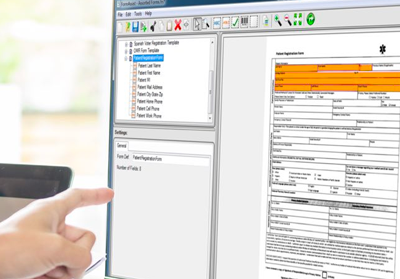
FormAssist Sample Application with Source Code |
- Quickly evaluate Accusoft Pegasus’s forms processing technology, including:
- Use FormAssist source code as a foundation for developing your production forms processing application:
- Modular source code facilitates rapid development of form setup and forms processing solutions
- Illustrates best practice for integration of Pegasus components and example workflow
- Included in the FormSuite .NET toolkit download as C# source code
- Quickly set up forms and processing instructions
- Create, save, and manage form sets
- Add form templates to form sets
- Set up and add recognition fields to form templates
- Configure properties for image cleanup, OCR, ICR, OMR, and processing
- Process filled images to optimize settings for OCR, ICR,OMR, and form identification
|
|
|
|
FormSuite structured forms processing SDK collection; zonal OCR, ICR, OMR
|